For .au domains (e.g., .com.au, .net.au, .org.au) Use this quick link to get your EPP code instantly: https://pw.auda.org.au/ Enter your domain name → code sent to registrant email.
For all other TLDs (e.g., .com, .net, .co.uk, etc.) Get your EPP/Auth code from your current registrar:
- Log in to your current registrar account
- Look for “Transfer Out”, “Get Auth Code”, “EPP Code”, “Authorization Code”, or “Domain Password”
- If you can’t find it, contact their support directly and ask for the code
- They will email it to the registrant email on file (check spam/junk)
Step 1: Start the Transfer on Help.com
- Log in to your Help.com account (or sign up at https://www.help.com).
- After logging in, navigate on the Left menu: Registrar → Transfer Domain.
- On the Transfer Domain page, enter domain name (no www): e.g., example.com.au or example.com.
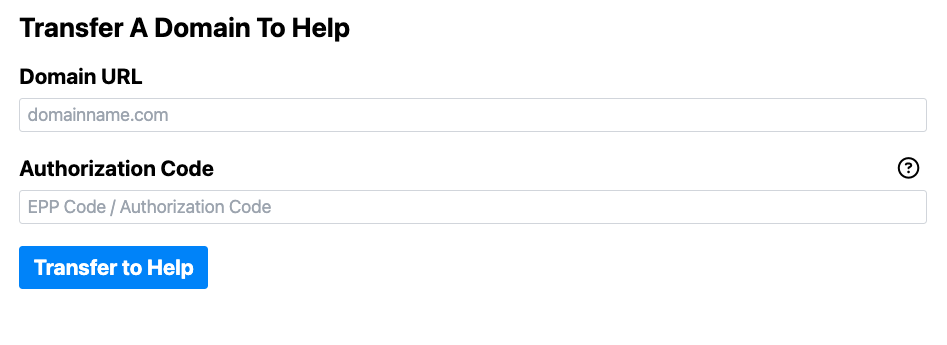
- Then in the second box Paste the EPP Code/Auth Code.
- Click Next. Depending if your TLD supports Free Transfer or not you will be prompted to an Invoice and payment page confirming the request. Payment will be required for TLDs that do NOT support Free Transfers.
Step 2: Approve the Transfer
- After payment or initial approval on Help.com for the Transfer is made.
Check your email (registrant email on the domain) — you’ll get two emails soon:- One from your current registrar
- One from Help.com
- Open both emails and approve the transfer (click the link or follow instructions).
- The domain transfers in 2–5 days (sometimes up to 7 days).
Notes
- Keep checking email (including spam) for approval links.
- If no emails arrive or you get stuck, feel free to contact Support: Support@help.com